¶ Trouble Shooting
¶ Flashing XRP Firmware
- Migrating from WPILib to XRPLib
- Something went wrong and the board isn't working
If you installed the WPILib for XRP you will no longer be able to access XRPCode until you reinstall the Firmware.
https://www.youtube.com/watch?v=2ejNF42DK2s
Download and install Thonny
Hold down Boot button on the XRP controller and plug it in with USB
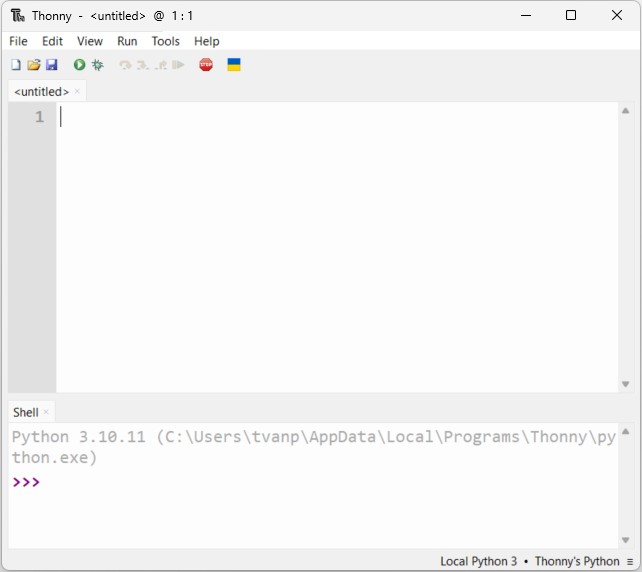
Open Thonny
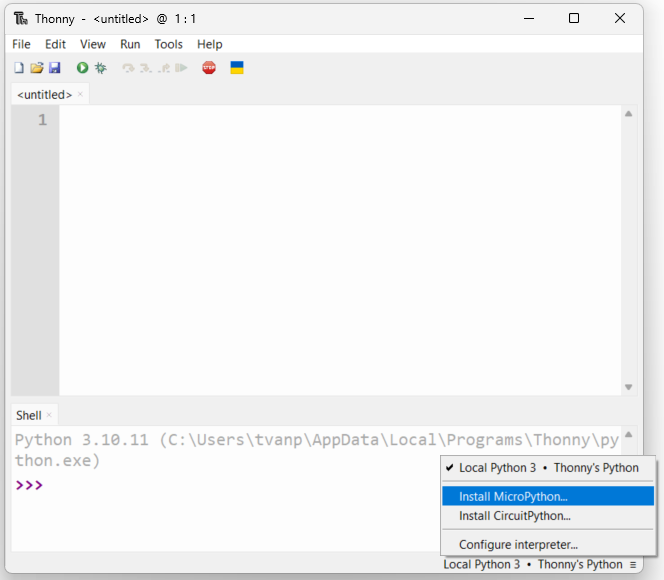
On the bottom right hand corner click
Thonny's Python
Select Install MicroPython...
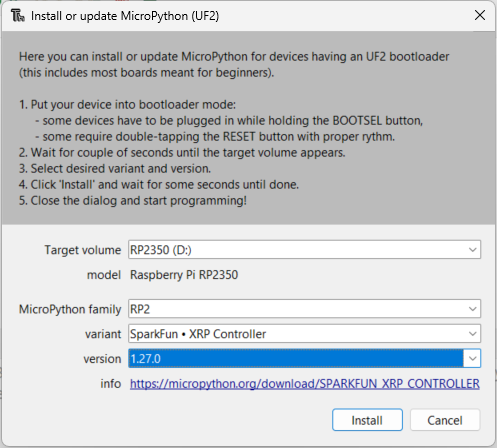
Use the following settings (View the image)
- MicroPython Family: RP2
- Variant: SparkFun XRP Controller
- Version: 1.27.0
The version is old, but it will update when we connect to XRPCode.
7) Once that process is complete, navigate to xrp.wpsrobotics.org
8) Press Connect to XRP, Then follow the instructions given on XRPCode to update the controller.
¶ Field Centeric Not Working?
Remove
from XRPLib.defaults import *
When this is in there, the imu goes funky when imported and started twice. Its generally not needed anyways.
¶ How to Install Library Files
All custom library files from WPS Robotics XRP website will auto sync, but if you need to install a diffrent library or the WPS Robotics library files are not on your XRP for some reason. Follow the steps below.
Download the file from the List of Library Files
Then open xrp.wpsrobotics.org, and connect to your XRP
Once your connected, go to File>Upload To XRP. Select the downloaded file and open.
Select the XRPLib folder and press "Ok".
Repeat this action for both files.